Motivation
Typing has become an increasingly important feature of modern Python. It has changed how code is written, helped prevent errors, and improved the experience of working with modern editors. Pysmo brings these features to seismology.
'Class' and 'type'
The paragraphs below use the words "class" and "type" frequently. The
relationship between them shows up in the built-in float type:
- Assign a float to
a. - Check its type with the
type()built-in. - The type of the
floatclass is itself a type.
The type of a class is itself a type, so every class defined in Python also defines a type.
The problem with types in seismology
Most introductory programming courses start with the available data types:
simple ones like integers, floats, and strings, then compound ones like arrays
and dictionaries. These are clearly defined and intuitive. It is obvious, for
example, that passing the string "hello world" to a routine that computes a
square root makes no sense.
Moving from general-purpose programming to a specialised field, the inputs and outputs of a piece of code tend to get more complex. At some point the intuition for the data being handled is gone.
Processing seismological data in Python naturally leads to treating a seismogram as a type of its own. But which attributes that type should hold depends on what the processing needs. A seismogram type defined around one application may not suit another. Defining it as broadly as possible to cover many cases brings back the same loss of intuition, and the type becomes an abstract construct with little connection to a seismogram as observed in nature or handled mathematically. It still cannot guarantee it will fit every future use case.
File formats in seismology
The situation with seismological file formats, and how they are used for processing, is similar. A format's design centres on data storage, but often reaches towards applications as well. SAC is one example: it is essentially an application with its own file format, and SAC files are also a common input format for third-party applications. That works because a SAC file can hold a large amount of metadata in its "headers". The approach has drawbacks:
- Most SAC headers are optional (only 6 are mandatory), so there is no guarantee a given header is set. Code has to check.
- The format defines over 150 headers, which takes detailed knowledge to use, and still rarely feels intuitive.
- The headers are fixed by the format. Custom data have to go in the "user-defined headers", or, once those run out, in other headers repurposed to mean something else.
The pysmo solution
No one can know every way a seismogram might be used in future, so an all-encompassing seismogram type is out of reach, and would be awkward to use in any case. Pysmo instead defines a seismogram type from what different seismograms have in common. The approach:
- Seismogram data are stored in any class, existing or new. Call this the "data seismogram". Any Python class is also a type, usable in annotations.
- The attributes all seismograms share define the pysmo type. It is used only in
annotations, so it need not be a real class:
Protocolclasses serve this purpose. - Code that needs specific attributes or methods of the data seismogram is annotated with that class.
- Code that uses only the shared attributes is annotated with a pysmo type instead.
Data can then be stored and used in any way, and code annotated with pysmo types stays reusable.
Not every pysmo type has this origin. Seismogram is the
clearest case of it; for the other reasons a type may exist, see
"Why does this type exist?" on the types
page.
Code writing experience
Type hints in Python are not enforced at runtime. They are most useful alongside a type-aware editor, usually as autocomplete and error checking.
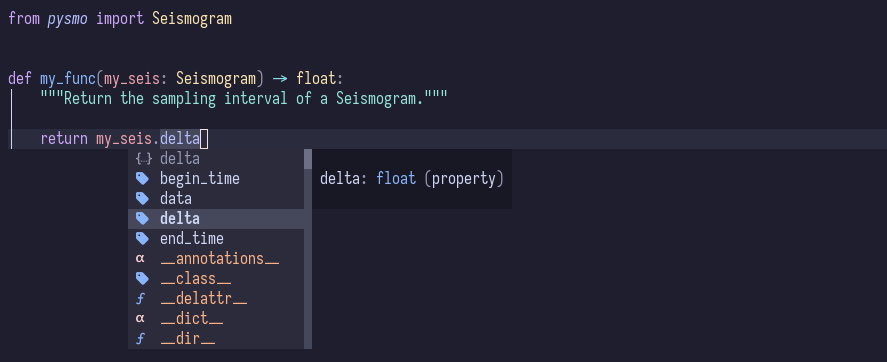
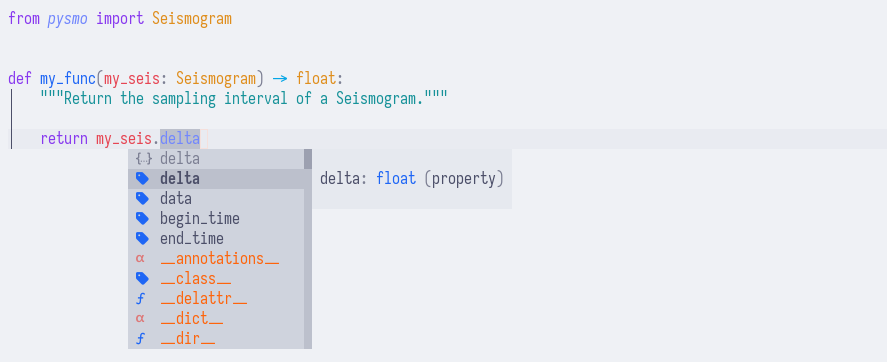
Autocomplete
Once installed, the pysmo types import and
behave like any class. Annotating a function argument with the Seismogram type
lets a type-aware editor list the available attributes and offer autocomplete
for them:
Error checking
A coding error such as accessing an attribute that does not exist produces a warning in the editor:


These warnings are not only for typos. They also catch errors such as setting
delta to a string instead of a float.
Type checking without an editor
Editor integration is convenient but not required. mypy runs the same checks from the command line, over a single file or a whole package:
This is also what runs in continuous integration, where there is no editor. A
clean run reports Success: no issues found; otherwise each error is printed
with its file and line. Add mypy to a project with uv add --dev mypy.